TabsOnRails is a simple Rails plugin for creating and managing Tabs. It provides helpers for creating tabs with a flexible interface.
If you ever had to create a tab-based navigation menu at least once, you perfectly know how annoying it can be. You have to create the menu, set active status in your controllers and reflect selection status in your view. TabsOnRails does all the boring stuff for you and lets you focus on the customization.
Let me show you how it works.
Quick Start
In your template, use the tabs_tag helper to create your tab.
<%= tabs_tag do |tab| %>
  <%= tab.home       'Homepage', root_path %>
  <%= tab.dashboard  'Dashboard', dashboard_path %>
  <%= tab.account    'Account', account_path %>
<% end %>
The example above produces the following HTML output.
<ul>
  <li><a href="/">Homepage</a></li>
  <li><a href="/dashboard">Dashboard</a></li>
  <li><a href="/account">Account</a></li>
</ul>
The usage is similar to the Rails routes.rb file. You create named tabs with the syntax tab.name_of_tab. The name you use when creating a tab is the same you’re going to refer to in your controller when you want to flag the tab as active with current_tab.
class DashboardController < ApplicationController
  current_tab :dashboard
end
Now, for any action defined in the DashboardController, the template will automatically render the following HTML code.
<ul>
  <li><a href="/">Homepage</a></li>
  <li><span>Dashboard</span></li>
  <li><a href="/account">Account</a></li>
</ul>
Restricting current_tab scope
Of course, there are specific situations where you need to change current_tab only for some specific action in your controller.
The current_tab method understands all options you are used to passing to a Rails controller filter. In fact, behind the scenes this method uses a before_filter to set a special @current_tab variable. Taking advantage of Rails filter options, you can restrict a tab to a selected group of actions in the same controller.
class PostsController < ApplicationController
  current_tab :admin
  current_tab :posts, :only => [ :index, :show ]
end

class ApplicationController < ActionController::Base
  current_tab :admin, :if => :admin_controller?

  def admin_controller?
    self.class.name =~ /^Admin(::|Controller)/
  end
end
Customizations
All your tabs belong to you! As you can imagine, your tab structure might be slightly different from the default one. For example, you might want to flag the active tab with a current CSS class and preserve the link with a nice hover effect. Or perhaps your tab is an ordered list (<ol>).
No problem! The library is completely customizable using custom builders. See the documentation for further details on how to create and use a custom Tab Builder.
Here’s just a couple of examples created using custom builders.
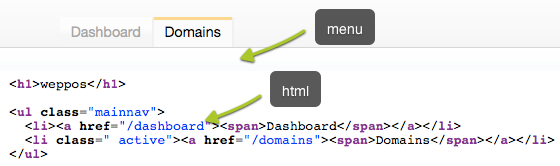
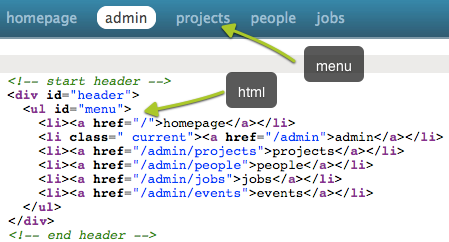
Cool! How do I get the plugin?
Source code and issue management are powered by GitHub, the project homepage and documentation are hosted on this site. The plugin is available both as a gem and as a Rails plugin. See the documentation page to learn how to install it.